

2.4GHz vs 5GHz WiFi: Which Should You Use?

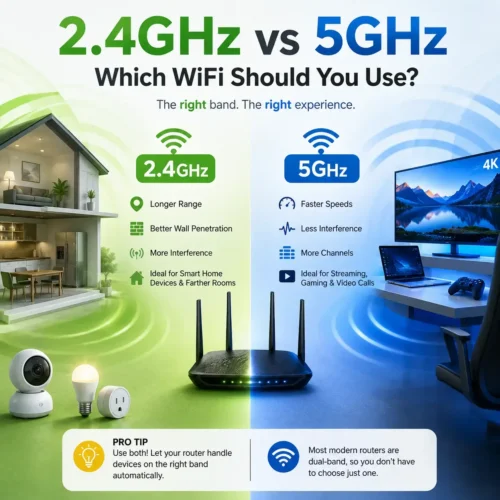
2.4GHz offers longer range and better wall penetration but slower speeds. 5GHz offers faster speeds and less interference but shorter range.
5GHz, if you're within good range of your router. It offers higher speeds and lower latency, which matters for smooth streaming and responsive gaming.
2.4GHz, in most cases. Many smart plugs, bulbs, and sensors only support 2.4GHz, and its longer range is better for devices placed far from the router.
That's called band steering — your router automatically shifts your device to whichever band gives the best connection based on distance and signal strength.
Yes, most routers let you disable either band from the admin settings, though it's rarely necessary for normal home use.
Table of Contents
2.4GHz vs 5GHz WiFi: Which Should You Use?
I still remember the first time someone told me my router was “broadcasting two networks.” I stared at my phone’s WiFi list, saw “HomeNetwork” and “HomeNetwork-5G” sitting right next to each other, and thought — wait, do I have two routers now? Turns out, no. That’s just how modern WiFi works, and honestly, once you understand it, a lot of those random “why is my internet so slow in the bedroom” mysteries start making sense.
So let’s talk about it. 2.4GHz vs 5GHz WiFi isn’t some obscure engineering debate — it directly affects whether your video calls freeze, whether your smart plug connects on the first try, and whether your gaming session lags at the worst possible moment. By the end of this, you’ll know exactly which one to reach for and when.
First, What Even Is a WiFi “Band”?
Think of your router like a radio broadcaster. Instead of playing music, it’s sending your internet data through the air using radio waves. The frequency of those waves — measured in gigahertz — determines how that signal behaves: how far it travels, how much data it can carry, and how easily it gets jammed up by other stuff in your house.
Most routers sold in the last decade are “dual-band.” That means they’re pumping out two separate signals at once — one on 2.4GHz, one on 5GHz — and your devices connect to whichever one makes sense (or whichever one you manually pick). Some of the newest routers throw a third band, 6GHz, into the mix under WiFi 6E and WiFi 7, but that’s a story for another post.
If you want the nerdy technical details straight from the source, the Wi-Fi Alliance has a good rundown of how all this actually gets certified and standardized.
2.4GHz: The Band That Refuses to Retire
People love to call 2.4GHz “old” or “outdated,” and sure, it’s been around since the early 2000s. But calling it obsolete misses the point entirely — it’s still doing a job that 5GHz genuinely can’t do as well.
What it’s good at:
Distance, mostly. Lower frequency waves have longer wavelengths, and longer wavelengths just handle obstacles better — walls, floors, furniture, whatever’s in the way. If your router lives in the living room and you’re trying to stream something two floors up, there’s a decent chance 2.4GHz is the only thing keeping that connection alive.
It’s also the band that basically every cheap or older device defaults to. Smart plugs, security cameras, that one smart bulb you bought three years ago — a lot of them simply don’t know 5GHz exists.
Where it struggles:
Speed, for one. It just can’t move as much data per second compared to its faster sibling. And then there’s the crowding problem — 2.4GHz shares airspace with microwaves, Bluetooth devices, baby monitors, even some cordless landlines. Combine that with the fact that there are really only three non-overlapping channels people commonly use (1, 6, and 11), and you can see why apartment buildings full of routers turn this band into a bit of a mess.
5GHz: Built for Speed, Not Distance
5GHz showed up specifically to fix what 2.4GHz couldn’t handle anymore — namely, all of us trying to stream 4K video and download massive files at the same time without the whole network choking.
Why people love it:
Raw speed, mainly. 5GHz supports much wider channels, which is basically the difference between a two-lane road and an eight-lane highway. More room means more data moving at once. It also faces way less interference from household gadgets, and it’s got a lot more available channels, so if you live somewhere crowded with routers, 5GHz tends to stay noticeably cleaner.
The catch:
Range. Or really, the lack of it. Higher frequency signals lose steam faster and don’t punch through walls nearly as well. Stand two rooms away with a thick wall between you and the router, and don’t be surprised if 5GHz just… gives up. Older devices are also a problem here — plenty of budget electronics were never built to talk on this band at all.
Quick Comparison
| 2.4GHz | 5GHz | |
|---|---|---|
| Speed | Slower | Faster |
| Range | Goes farther | Drops off quicker |
| Handles walls/obstacles | Better | Worse |
| Interference from other devices | More | Less |
| Available channels | Limited | Plenty |
| Works with older gadgets | Usually yes | Not always |
| Best suited for | Smart home devices, far-from-router use | Streaming, gaming, video calls |
I know tables like this can feel a little clinical, but honestly, it’s the fastest way to see the tradeoff. Neither band “wins” outright — it really comes down to what you’re doing and where you’re sitting when you do it.
Why 5GHz Usually Feels Faster
Ever run a speed test twice in the same spot and gotten wildly different numbers? Nine times out of ten, that’s a band-switching issue, not your internet plan acting up.
Because 5GHz can use those wider channels — up to 160MHz on newer hardware — it’s just physically capable of shoving more data through at once. 2.4GHz is stuck with narrower lanes no matter how good your router is. So if you’re gaming, editing video off a NAS, or just tired of buffering during movie night, and you’re reasonably close to your router, 5GHz is almost always going to feel snappier.
Curious what your setup is actually delivering right now? Speedtest by Ookla is a quick way to check which band is actually pulling its weight in your home.
Why 2.4GHz Still Earns Its Keep
But speed isn’t the whole story, is it? If you’ve got a camera watching the garage, a thermostat two floors away, or you like working from the back porch, range suddenly matters way more than bandwidth.
This comes down to basic physics — longer wavelengths bend around obstacles more easily instead of just smashing into them and losing energy. That’s exactly why 2.4GHz can still show a usable signal in the basement long after 5GHz has thrown in the towel.
It’s also why smart home manufacturers keep building 2.4GHz-only devices, even in 2026. It’s not laziness — for something like a $15 smart plug sitting in a far corner of your house, reliable range matters a lot more than shaving milliseconds off a data transfer.
The Interference Problem Nobody Talks About Enough
Here’s something people rarely consider: WiFi doesn’t operate in isolation. Your 2.4GHz band is sharing airspace with your microwave, your neighbor’s Bluetooth speaker, baby monitors, and sometimes even cordless phones if anyone still has one of those. In a crowded apartment complex where dozens of routers are all fighting over the same three usable channels, things get noisy fast — kind of like trying to have a conversation at a packed party where everyone’s shouting over each other.
5GHz, with far more non-overlapping channels available, tends to stay a lot calmer even in dense environments. If you’ve ever moved into a new apartment building and suddenly noticed your WiFi feels worse than it did at your old place, congestion on the 2.4GHz band is a common culprit.
If you want to dig into how this unlicensed spectrum gets allocated in the first place, the FCC has some background reading on it.
Not Every Device Gets a Vote
Here’s the thing — sometimes this whole “which band should I use” question is out of your hands, because plenty of gadgets simply don’t support both.
Usually stuck on 2.4GHz only: older smart bulbs and plugs, basic security cameras, cheap printers, and older-generation smart speakers.
Usually fine with either: modern phones and laptops, smart TVs, streaming boxes, gaming consoles, and newer smart home hubs.
If a device is refusing to connect and you can’t figure out why, check whether it even supports 5GHz before you spend twenty minutes resetting your router out of frustration. I’ve been there. It’s almost always this.
So Which One Should You Actually Pick?
Honest answer? You probably don’t have to choose at all.
Most routers today handle this automatically through something called band steering — your device gets nudged toward whichever band makes sense at any given moment, without you lifting a finger. Walk closer to the router, and it might quietly bump you to 5GHz. Wander out to the yard, and it’ll likely shift you back to 2.4GHz to keep the connection alive.
But if you’re the type who likes a little more control, here’s a simple way to think about it:
Reach for 5GHz when you’re close to the router and care about speed — streaming, gaming, video calls, anything bandwidth-hungry.
Reach for 2.4GHz when you’re far from the router or connecting something like a smart plug or sensor that just needs a stable, low-effort connection.
Let band steering handle it when you’d rather not think about any of this — which, honestly, is most people, most of the time.
If your router lets you name each band separately, you can manually assign specific devices — put your gaming PC and smart TV on 5GHz, leave your far-flung sensors on 2.4GHz, and let everything else sort itself out.
Want to go further down this rabbit hole? Check out our guide on choosing the best WiFi router for your home, or our breakdown of WiFi 6 vs WiFi 6E vs WiFi 7 if you’re curious how newer standards build on top of these same two bands.
A Few Things That’ll Actually Improve Your WiFi
Small changes here can make a bigger difference than people expect:
Move your router somewhere central. Signal fades with distance and obstacles, so a router shoved in a corner closet is working against you no matter which band you’re on.
Keep the firmware updated. Manufacturers patch performance and security issues fairly often — worth a look at our home network security guide if you haven’t touched this in a while.
Split the band names if you’re troubleshooting. If band steering seems to be causing more problems than it solves, separating “HomeWiFi” and “HomeWiFi-5G” temporarily can help you figure out which devices actually prefer which band.
Keep your router away from microwaves and cordless phones. Small thing, but it genuinely helps if you’re leaning on 2.4GHz a lot.
Consider mesh WiFi for bigger homes. If 5GHz keeps dropping out in certain rooms, a mesh system can help spread strong coverage across more square footage than a single router can manage alone.
FAQs
What’s the main difference between 2.4GHz and 5GHz WiFi? 2.4GHz travels farther and handles walls better but moves data more slowly. 5GHz is much faster but doesn’t reach nearly as far.
Which band should I use for streaming or gaming? 5GHz, assuming you’re not too far from the router. You’ll get better speed and lower latency, which matters a lot for both.
Which band should I use for smart home devices? Usually 2.4GHz. A lot of smart plugs, bulbs, and sensors only support it anyway, and its range is a better fit for devices scattered around the house.
Why do I see two networks with almost the same name? That’s your router broadcasting both bands separately — something like “HomeWiFi” and “HomeWiFi-5G” — so you can pick one manually if you want.
Is 5GHz WiFi the same thing as 5G on my phone? No, and this trips people up constantly. 5GHz WiFi is a home network frequency. 5G is a cellular standard used by mobile carriers. They just happen to share a number.
Does using 5GHz cost anything extra? Nope. Both bands come standard on any dual-band router — no added cost either way.
Why does my phone keep switching bands on its own? That’s band steering doing its job — quietly moving your device to whichever band gives it the strongest connection at that moment.
Can I just turn off one of the bands? Yes, most routers let you disable either one from the settings panel, though there’s rarely a good reason to unless you’re troubleshooting something specific.
Which band deals with less interference? 5GHz, generally. Fewer everyday devices operate on that frequency compared to the crowded 2.4GHz band.
Does distance from the router matter when picking a band? Definitely. The farther you get, the more likely 2.4GHz will actually outperform 5GHz, even though 5GHz is faster up close.
Wrapping Up
At the end of the day, 2.4GHz vs 5GHz WiFi isn’t really a competition — it’s more like picking the right tool for whatever you’re trying to do. Need reach? 2.4GHz has your back. Need speed? 5GHz is the one you want. And thanks to dual-band routers and band steering, you often don’t even have to think about which is which — your network quietly sorts it out behind the scenes.
But now that you know the difference, the next time your smart plug won’t connect or your stream keeps buffering in the back bedroom, you’ll actually know why — and more importantly, exactly what to do about it.