

Earbuds Not Charging in Case? Here’s What’s Actually Going On

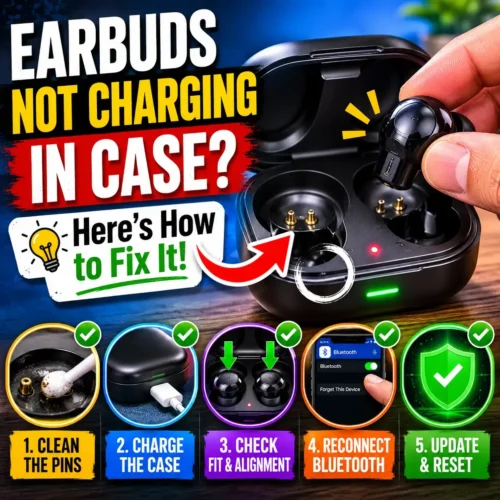
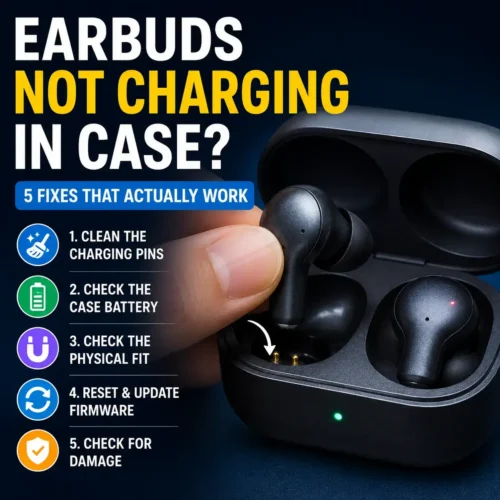
Why Earbuds Stop Charging in Their Case — The Short Version
Before getting into the fixes, it’s worth understanding what’s actually happening when charging fails earbuds not charging in case.
True wireless earbuds charge through tiny metal contact pins — small raised dots on the earbuds that touch corresponding pins inside the case slots. When you place the earbuds in, those pins connect and current flows from the case battery into the earbuds. It sounds simple because it is simple. But that simplicity is also why it breaks in predictable ways.
The contact area between earbud and case is tiny — sometimes just two or three pins, each only a millimeter or two across. Any debris, oxidation, misalignment, or moisture sitting on those pins interrupts the connection. No connection means no charging. The earbuds can look perfectly seated and still not be charging if the contact isn’t actually happening at the pin level.
Most earbuds not charging in case situations come down to one of five things: dirty pins, dead case battery, misalignment, firmware issues, or physical damage. The first three are almost always the culprit. The last two are less common but worth knowing about earbuds not charging in case
Fix 1 — Clean the Charging Pins (This Solves It Most of the Time)
Dirty charging contacts cause the majority of earbud charging failures. Not occasionally — the majority. Skin oils from your ears, earwax, dust, pocket lint, tiny particles of basically everything — they all end up on the charging pins over time. You can’t see most of it with the naked eye, which is why people don’t check this first.
Here’s what to use: a dry cotton swab for the initial clean. Gently rub the pin contacts on both the earbuds and the inside of the case slots. You’re not scrubbing — just wiping. If the swab comes away with any discoloration or debris, that’s what was blocking your charging and earbuds not charging in case.
If the dry swab doesn’t do it, slightly dampen a fresh cotton swab with isopropyl alcohol — 70% or higher is best. The alcohol dissolves oils and oxidation without damaging the pins or leaving moisture behind. Wipe the contacts gently, let everything dry completely for 60 seconds, then try charging again.
A few things not to do: don’t use water — it leaves mineral deposits and can damage the electronics. Don’t use metal objects to scrape the pins — you’ll damage the contact surface. Don’t blow into the case — the moisture in breath causes more oxidation, not less.
After cleaning, place the earbuds carefully back into the case and watch for the charging indicator. Most cases show a light on each slot when the earbud is properly charging. If the lights come on immediately after cleaning — you found the problem.
Fix 2 — The Case Battery Might Be Dead (Even If the LED Is On)
This one catches people out more than almost anything else.
Your charging case has its own battery. That battery powers the charging circuits that send power to your earbuds. When the case battery drops low enough — usually below 10-15% — it may not have enough power left to actually charge the earbuds, even though it still has enough to light up the LED indicators.
So you can have a case that appears to be on, appears to have some charge, but is functionally unable to push power into the earbuds. From the outside it looks fine. From the inside, it doesn’t have what it needs to do its job. For earbuds not charging in case try this test …..
The test is simple: plug the case into a charger and leave it for at least 30 minutes before trying to charge the earbuds again. If the earbuds start charging once the case has some proper charge in it, the case battery was your problem.
This situation comes up more often than people expect because case batteries degrade over time just like phone batteries do. If your case is 12-18 months old and you’ve been charging it regularly, it may not hold as much charge as it used to. A case that used to give you three full charges of the earbuds might now only reliably give one.
For anything related to how lithium batteries degrade and what affects their lifespan, Battery University is the most thorough resource available — the same principles that apply to phone batteries apply to the battery inside your charging case.earbuds not charging in case
Make sure the cable and charger you’re using to charge the case are actually working too. Try a different cable first — cable failures are common and often invisible. The OnePlus 65W Warp Charger paired with a quality cable ensures the case is actually getting the power it needs rather than trickling in through a failing cable. And if you’ve been wondering whether your current charger setup is hurting your devices, our original vs fake charger guide explains exactly what to look for.
Earbuds Not Charging in Case — Fix 3: Check the Physical Fit
Earbuds look seated properly but aren’t actually making contact. This happens more than people realize and it’s surprisingly easy to miss.
Each earbud slot in a charging case is shaped specifically for that model. The earbuds need to sit in exactly the right position for the charging pins to align. If an earbud is slightly twisted, sitting at a slight angle, or not pushed down fully — it can look fine visually while the pins aren’t touching.
This becomes more of an issue over time. Case magnets that hold the earbuds in place weaken slightly with age. Small amounts of debris in the bottom of the slot raise the earbud just enough to break pin contact. Ear tips that are slightly the wrong size or shape can prevent the earbud from seating at the correct depth.
Try this: remove both earbuds completely, look inside the case slots with a flashlight, and check for any debris in the bottom. Even a small amount of lint can raise an earbud enough to break contact. Clear anything out with a dry toothpick or soft brush — no metal, no liquids.
Then re-seat each earbud with a deliberate press until you feel or hear it click into place. Don’t just drop them in. Push them down firmly into the slot and watch for the charging indicator. If you’re getting intermittent charging — charges sometimes, not others — misalignment is almost certainly the cause.
Also check your ear tips. Some people use third-party ear tips that are slightly larger than the originals, which can prevent the earbud from sitting at the correct depth in the case slot. If you’ve changed ear tips recently and the charging problem started around the same time, switch back to the original tips and see if that fixes it.
Fix 4 — Reset the Earbuds
Software issues cause a surprisingly high percentage of charging problems. Firmware bugs, connection state errors, pairing data corruption — these can interfere with how the case and earbuds communicate, which affects charging behavior.
The fix is a reset. The exact process varies by brand and model, but for most true wireless earbuds the general approach is: place both earbuds in the case, close the lid, wait 30 seconds, then open the lid. Some models require holding a button on the case for several seconds. Others have a reset procedure that involves putting the earbuds in the case and holding both touch surfaces simultaneously.
Check your specific model’s manual or the manufacturer’s support page for the exact reset steps — getting it wrong on some models can wipe pairing memory, which is a minor inconvenience but not a disaster.
After resetting, forget the earbuds on your phone’s Bluetooth settings completely and re-pair from scratch. This clears any pairing state errors that might have been contributing to the charging issue.
Also check whether a firmware update is available. Most true wireless earbuds update firmware through their companion app. If you have one installed, open it and check for updates. Manufacturers sometimes push firmware fixes specifically for charging issues — according to Samsung’s support documentation, keeping firmware updated is one of the primary recommended steps for resolving Galaxy Buds charging problems, and the same applies broadly across other brands.
Fix 5 — Check for Moisture Damage
This one is worth mentioning even though it’s less fixable than the others, because knowing it early can save you from making things worse.
Moisture — from sweat, rain, humidity, or accidentally getting the earbuds wet — can corrode the charging pins over time. Corrosion builds up as a greenish or whitish residue on the metal contacts. Unlike dust and oil which clean off easily, oxidation from moisture damage is harder to remove and can permanently affect charging reliability if left long enough.
If your earbuds have an IPX rating — IPX4 or higher — they can handle sweat and splashes but they’re not immune to moisture damage forever. Regular cleaning of the pins after sweaty gym sessions extends their life significantly.
For mild corrosion: the isopropyl alcohol cleaning method from Fix 1 can sometimes remove early-stage oxidation. Wipe gently, let dry completely, check if charging improves.
For more significant corrosion: this is when professional repair or replacement becomes the realistic conversation. Severe pin corrosion can’t be cleaned away — the metal surface itself has changed and the conductivity is permanently reduced.
If you’re buying earbuds specifically for gym use and sweat exposure is going to be a regular thing, checking the IPX rating before buying is worth the thirty seconds it takes. Our best wireless earbuds under $30 guide covers what IPX ratings actually mean and what to look for in budget earbuds that will hold up to regular sweat exposure.
One Earbud Not Charging in Case — Why This Happens
This specific situation — one charges fine, the other doesn’t — usually points to one of three things.
The non-charging earbud’s pins are dirty while the other one’s aren’t. Earwax and debris build up unevenly because one ear tends to produce more than the other, or because of how you handle each earbud when taking them out. Clean both regardless — not just the one with the problem.
The slot for the non-charging earbud is slightly misaligned or has debris in the bottom that the other slot doesn’t have. Look inside both slots carefully and compare them. Even a tiny difference in how an earbud sits can be the difference between charging and not charging.
One earbud has a failing battery. Individual earbud batteries can degrade at different rates, particularly if one was exposed to more heat, more charge cycles, or a specific impact. If one earbud consistently charges slower or stops holding charge while the other is fine — the battery in the problematic earbud may need replacement.
This is also worth watching if you use one earbud at a time. If you only ever use the left earbud for calls and leave the right one in the case, the left one goes through far more charge cycles and will degrade faster. Try to use both earbuds roughly equally to extend balanced lifespan.
When to Accept It’s Not Fixable at Home
Most earbuds not charging in case problems are solved by the fixes above. But there are situations where the problem is genuinely hardware failure that needs professional repair or replacement.
Physically bent or broken charging pins — if you can see that a pin is visibly bent or missing, cleaning won’t help. This needs a repair.
Water damage beyond the surface — if the earbuds were submerged or heavily exposed to water beyond their IPX rating, internal corrosion may have reached the circuit board, not just the pins.
Case charging circuit failure — if the case charges fine from a cable but consistently fails to charge the earbuds despite clean pins and good alignment, the charging circuit inside the case itself may have failed. This is a repair or replacement situation.
Battery completely dead from deep discharge — if earbuds or a case sit unused for several months and the battery fully discharges to zero, lithium batteries can sometimes enter a state where they won’t accept a charge through normal means. Some repair shops can revive these; many can’t.
Before assuming you need a replacement, it’s worth contacting the manufacturer’s support. Many brands have a warranty process that covers charging defects, and even out-of-warranty repairs are often cheaper than buying a new pair.
How to Stop This Happening Again
Once you’ve fixed the charging problem, a few habits keep it from coming back.
Clean the pins monthly. Thirty seconds with a dry cotton swab on both the earbuds and case slots prevents the buildup that causes most charging failures. Do it once a month and you’ll probably never have a dirt-related charging problem again.
Store them in the case. This sounds obvious but a lot of people leave earbuds out on a desk or in a pocket loose. The case protects the charging pins from dust and debris accumulation.
Don’t charge the case overnight every night. Keeping a lithium battery at 100% for extended periods degrades it faster than regular cycling between 20-80%. Our smartwatch battery life guide covers battery health habits that apply equally to earbud cases — the principles are the same across all lithium-based devices.
Dry the earbuds before putting them in the case after workouts. If you use earbuds at the gym, let them air out for a minute before returning them to the case. Putting sweaty earbuds directly into a closed case traps moisture against the pins, which accelerates oxidation.
Check the cable you use to charge the case. Old, damaged, or cheap cables deliver inconsistent power that can stress the case’s charging circuit over time. A quality cable makes a difference to both charging speed and long-term reliability.
Related Reading From FusionsHub
- Best Wireless Earbuds Under $30 — Full Buying Guide
- Original vs Fake Charger — Real Danger Buying Guide
- Why Is My Phone Charging Slow?
- Fast Charging Battery Damage — Is Your Charger Safe?
- ANC vs Battery Life — The Truth
- iPhone 16 Charging Issues
- Smartwatch Battery Life Tips — 7 Hacks to Save Power
People Also Ask
Why are my earbuds not charging in the case? The most common causes are dirty charging pins, a dead or low case battery, or the earbuds not sitting properly in their slots. Start by cleaning the metal contact pins on both the earbuds and inside the case with a dry cotton swab. Then make sure the case itself has charge by plugging it in for 30 minutes. These two steps fix the problem in the majority of cases.
How do I clean earbud charging contacts? Use a dry cotton swab to gently wipe the metal pins on the earbuds and the corresponding contacts inside the case slots. If there’s visible residue or the dry swab doesn’t help, lightly dampen a fresh cotton swab with isopropyl alcohol and wipe again. Let everything dry completely before placing the earbuds back in. Never use water or metal tools on the contacts.
Why is only one earbud not charging in the case? Usually dirty pins on the non-charging earbud, debris in that specific case slot, or the earbud not sitting correctly in its slot. Clean both earbuds and both slots thoroughly, check for anything in the bottom of the problem slot, and re-seat the earbud with a firm deliberate press. If the problem continues after cleaning, one earbud’s battery may be failing.
Can I fix earbuds that won’t charge without replacing them? In most cases, yes. Cleaning the pins, charging the case fully, and checking alignment solve the vast majority of charging problems without any repair or replacement needed. Hardware failure — bent pins, water damage, dead batteries — does sometimes require repair or replacement, but this is less common than software and contact issues.
How long should earbuds take to charge in the case? Most true wireless earbuds charge fully in the case within 1-2 hours. If yours are taking significantly longer than usual, it may indicate a dirty contact reducing charging efficiency, a case battery that’s degraded and delivering less current, or a cable delivering insufficient power to the case. Try cleaning the contacts and using a different cable first.
Why did my earbuds suddenly stop charging overnight? Sudden charging failures that happen overnight are usually the case battery running low — it had enough charge to start charging the earbuds but ran out before they finished. Or debris settled on the pins during the night in a way that broke contact. Charge the case fully and clean the pins — one of those two things fixes most sudden overnight charging failures.
Is it worth repairing earbuds that won’t charge? Depends on the cost of the earbuds and the cost of the repair. For budget earbuds under $30, professional repair often costs more than replacement. For mid-range earbuds $50-100, repair is usually worth attempting — contact the manufacturer about warranty coverage first, as many charging defects are covered. For premium earbuds, repair is almost always the better financial decision.
Earbuds that won’t charge are frustrating — but usually fixable in a few minutes. If you’re looking for a new pair that’s built to last through regular use and gym sessions, check out the A9 Wireless Earbuds, M10 Wireless Earbuds, and Pro 2 Wireless Earbuds — solid options at a price that doesn’t hurt.